
Rules keep recurring authoring requirements in one place. An enabled Rule is applied on the AI surfaces you choose, so authors do not have to repeat the same tone, terminology, or formatting instructions in every request.
You need Manage AI rules permission in a team workspace. For tutor behavior with learners, use Guardrails.
1. Write a Rule
- Open Organization → Rules, Skills & Templates → Rules.
- Select New rule.
- Enter a Title and an optional Short description.
- Keep Write content selected and enter the standing instruction in Content.
For example: “Use plain language and numbered steps. Name the relevant product control and finish each task with a concrete success check.” Make each Rule about a specific requirement so it is easy to review later.
2. Choose where it applies
- In Applies to, select the relevant surfaces.
- Use Workspace Assistant, Course Creator, or Course Editor for their respective conversations.
- Choose generation surfaces for requirements that belong in generated content: Topics and outlines, Reading generation, Flashcard generation, Quizzes and tests, Lecture generation, Podcast generation, Discussion generation, Song generation, Game generation, Video generation, or Comic generation.
- Select Apply everywhere when the same instruction should apply across all listed surfaces.
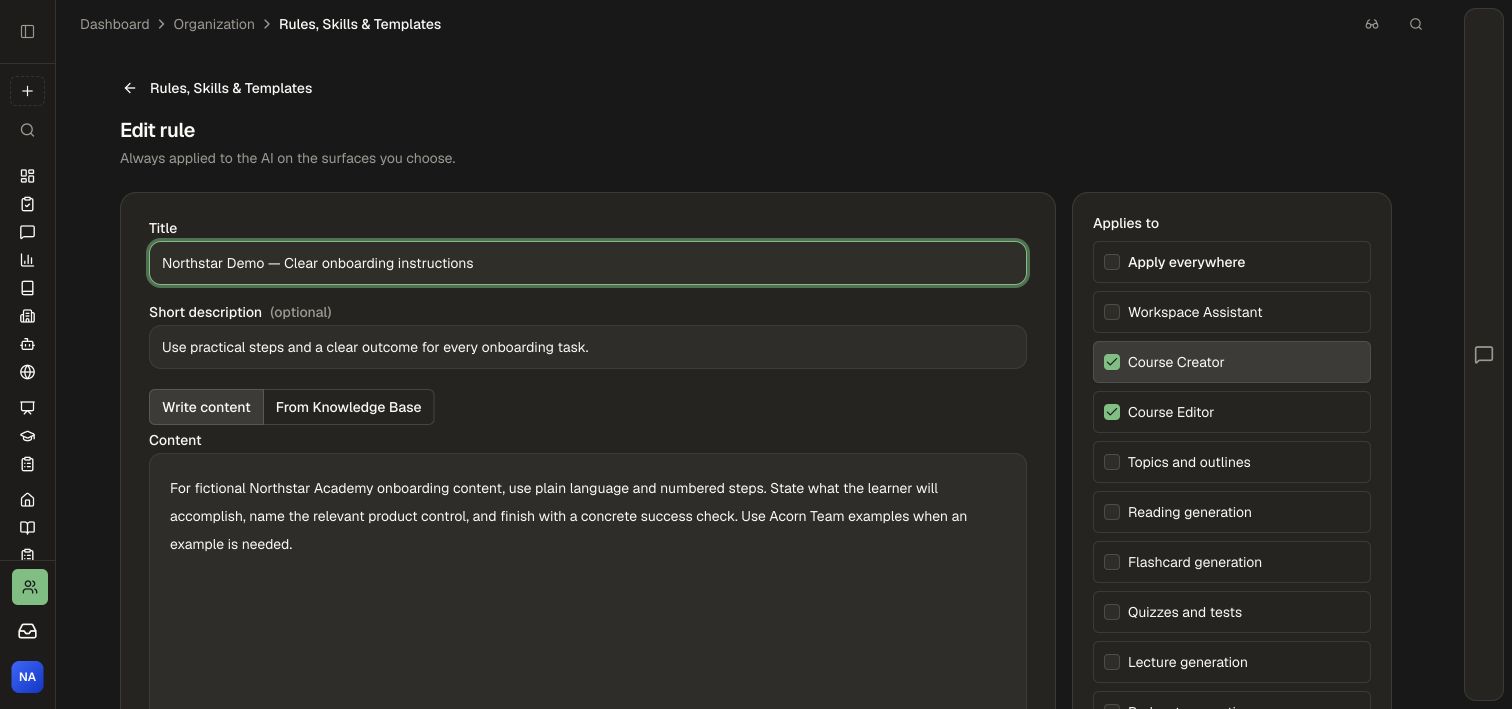
At least one surface is required. Selecting Course Editor and selecting Reading generation serve different purposes; choose both when the instruction should guide the conversation and generated readings.
3. Save and activate
- Leave Enabled off to save a Rule for review without applying it.
- Select Create.
- Reopen the Rule and check its content and selected surfaces.
- Turn on Enabled and select Save changes when it is ready.
- Start a request on a selected surface and review the result against the Rule.
Use a Knowledge Base document as the Rule
- Create or maintain an instruction document in the Knowledge Base.
- In the Rule editor, choose From Knowledge Base.
- Select the source document, set the title and surfaces, and save.
- Maintain the instruction in its source document. Honen uses its current indexed text when resolving the Rule.
The document becomes reusable AI guidance for the Rule's audience. Choose content intended for that audience, even when some recipients do not have direct access to the source document. Keep long reference libraries as course materials; a Rule's instruction content is limited to 12,000 characters.
Maintain the Rule library
Use the list's search to find a Rule by name or description. Select Edit to change it, use the up/down controls to organize its order, or switch it off to pause it. Delete a retired Rule using its named delete control and confirmation.
Keep instructions compatible with each other. Ordering makes the library easier to manage; clear, consistent instructions make the expected behavior easier to assess.
Related: Templates, Skills, Source ownership.