
Why adaptive learning is part of Honen
Honen makes creating courses and learning content easy. But the people taking those courses bring different experiences, goals, and needs. Someone may be meeting a subject for the first time, while someone else is refreshing knowledge they already use at work. One learner is preparing for an exam; another wants to solve a specific problem or explore a new interest.
People also learn at different paces and need different support along the way. An example that makes a concept click for one person may need more context for another. Some learners need another explanation and a chance to practice. Others are ready to explore further. Those needs can change from topic to topic, even within the same course.
That is why Honen includes adaptive learning. You create the course and define its learning goals. Honen can then connect readings and projects to each learner’s context, offer help when they encounter difficulty, suggest optional topics for practice or exploration, and help them revisit what they have learned over time. The six capabilities below work together to support those different needs within a shared course.
| Capability | Purpose | Where to find it |
|---|---|---|
| Course personalization | Learn about a learner’s goals and connect upcoming readings to their context. | Settings → Course personalization |
| Project personalization | Ask what learners want to build, then tailor project instructions and steps to an idea that matters to them. | Project editor → Personalize per student |
| Proactive Tutor | Offer timely help, encouragement, or congratulations during learning. | Settings → Proactive Tutor → Interventions |
| Adaptive Courses — Beta | Add optional topics for remediation or curiosity, with the learner’s agreement. | Settings → Proactive Tutor → Adaptive Courses |
| Retention and refreshers | Revisit earlier course goals with in-course refreshers and scheduled follow-ups. Missed checks become due again sooner. | Settings → Retention → Keep sharp |
| Spaced repetition in Study banks | Schedule recall practice for standardized-test preparation or ongoing review, using the learner’s recall ratings. | Learner’s Lesson plan → Study banks → Flashcards → Spaced repetition |
Choose how your course adapts
The course you create provides the foundation. You choose which adaptations are available, and learners accept additional topics before they enter the lesson plan.
Course personalization, Proactive Tutor, and Adaptive Courses have independent creator controls. A course can use personalized readings without proactive messages, or allow remedial topics while keeping exploration beyond the course off. Keep sharp has its own retention settings for refresher stops and follow-up cadence. In Study banks, learners choose scheduled spaced repetition or free practice with the course’s flashcards and quiz questions.
Project personalization has its own control on each supported project. For a website or app project, a short conversation can help learners choose something they want to build for themselves, then adapt the task to that idea while preserving the learning goals and grading criteria.
What the learner experiences
With these capabilities enabled, a learner’s journey might look like this:
- Share a goal. The learner answers course-specific questions or uses the creator-selected conversation with Honen.
- Start the course. Readings can use relevant examples while retaining the authored learning goals. The course header, tutor, and activities remain familiar.
- Practice. Ordinary feedback handles individual mistakes. A pattern of difficulty may prompt a small help bubble.
- Work with the tutor. The learner opens the bubble and discusses the concept. The tutor can explain, ask a diagnostic question, or suggest a short set of additional topics.
- Choose extra practice. Add & start adds the accepted set to the lesson plan under Just for you and opens the first topic.
- Continue independently. Learners use the same reading, flashcard, and quiz experience and can return to the authored course.
- Revisit earlier learning. When Keep sharp is configured, refresher stops revisit earlier goals during the course, and scheduled check-ins bring learners back after a unit or the course. Missing a refresher keeps that check in the review schedule.
- Keep practicing. Study banks bring course material together for spaced repetition and free practice, including preparation for a standardized test.
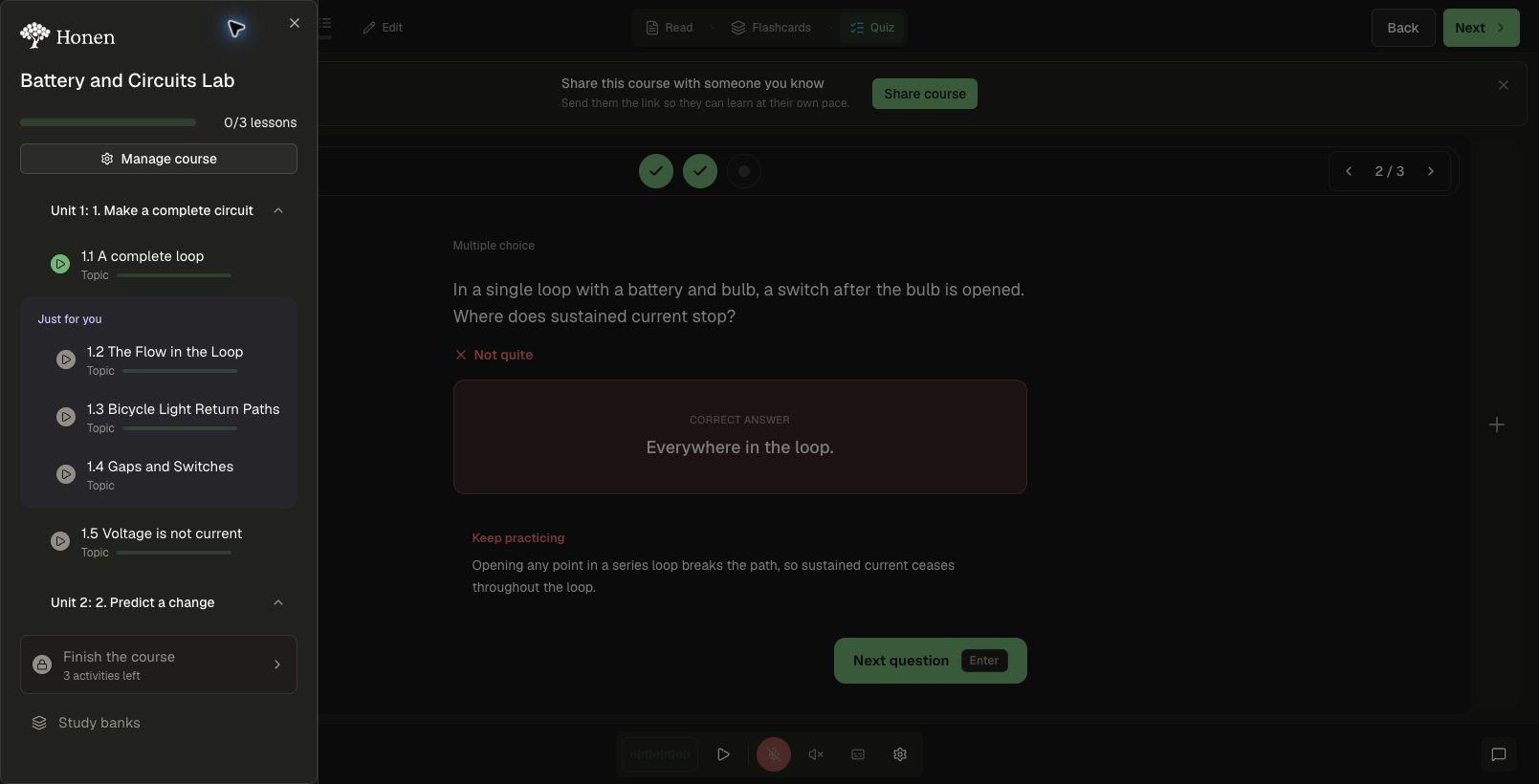
The screenshots in these guides show fictional circuits and heat-transfer courses. Generated messages and topic titles vary with the learner’s context.
Why adapt a course
Learners bring different prior knowledge, interests, and time to think. Keep the course objectives and required work clear, then adapt the examples and support around them. A teacher may use a classroom demonstration while a technician uses a repair scenario to learn the same circuit concept.
Use ordinary feedback first, offer a focused hint or conversation when useful, and add practice when the learner accepts it. Allow room for careful reading and reflection; taking longer does not, by itself, mean a learner needs remediation.
Check the impact through independent work after support, later retention, and learner feedback. More messages or more generated topics are not, by themselves, evidence of learning.
Enable the experience step by step
- Start with Course personalization: see the learner’s input screen and a reading comparison, then configure the questions and personalized content.
- Set up Proactive Tutor: see the bubbles and conversations, then choose when it may reach out.
- Add Adaptive Courses — Beta if learners may accept new topics. Choose remediation and exploration independently.
- Configure Retention and refreshers separately for course look-backs and follow-up checks. Direct learners to Study banks for independent review.
- Save and apply the course changes. Follow Enable and review adaptive learning to test the complete journey before rollout.
Reinforce learning over time
Retention helps learners revisit material after their first encounter. Keep sharp places brief refreshers in the course and can schedule later check-ins. A missed refresher becomes due again sooner; successful checks advance through the configured schedule.
Current refresher placement uses configured earlier-course goals. It does not automatically create new refresher stops from a learner’s full history of mistakes. For a specific difficulty that needs new explanations or practice, Proactive Tutor and Adaptive Courses can offer targeted additional topics with the learner’s agreement. See how retention works and how to enable it.
Read the guides
- Enable and review adaptive learning: configure the independent controls and check the learner journey.
- Personalize a course: choose questions or chat, and adapt readings.
- Personalize a project: ask what learners want to build and tailor a website or app project to their goals.
- Proactive Tutor: understand bubbles, conversations, and learner controls.
- Intervention reference: see when each kind of check-in is eligible.
- Adaptive Courses — Beta: add remediation and exploration topics.
- Retention and refreshers: revisit earlier goals and schedule follow-up checks.
- Spaced repetition and Study banks: schedule recall reviews or practice freely for tests and ongoing learning.