
Deliver a live Honen course through a cmi5-compatible LMS and carry detailed learning records into its Learning Record Store (LRS). The package connects your LMS to the course, so your team can keep improving the learning experience in Honen.
You need an organization workspace, permission to edit the course, and an LMS with cmi5 launch and LRS support. For a package-based LMS that uses SCORM, follow Export a SCORM package.
1. Prepare the course and audience
- Build and review the course, including the activities and assessments learners need to finish.
- Decide whether the learners are internal members of your team or an external audience.
- For internal learners, optionally create a group to organize their reporting.
- For external learners, create a Site in the same workspace. You will select it as the learner community during export.
- Confirm xAPI is enabled under Organization → Integrations → Your LMS → Learning records and cmi5. A workspace's first cmi5 export can initialize this configuration; keep it enabled for your cmi5 program.
2. Choose the package settings
- Open the course's manage screen and choose Export → cmi5 package.
- Under Who is taking this?, choose internal members or external learners.
- For internal delivery, use Add to group if you want automatic group enrollment. For external delivery, select the intended Site.
- If your workspace has multiple launch tenants, select the tenant for the receiving LMS.
- Choose Counts as finished when to define what your LMS must receive before the unit is satisfied.
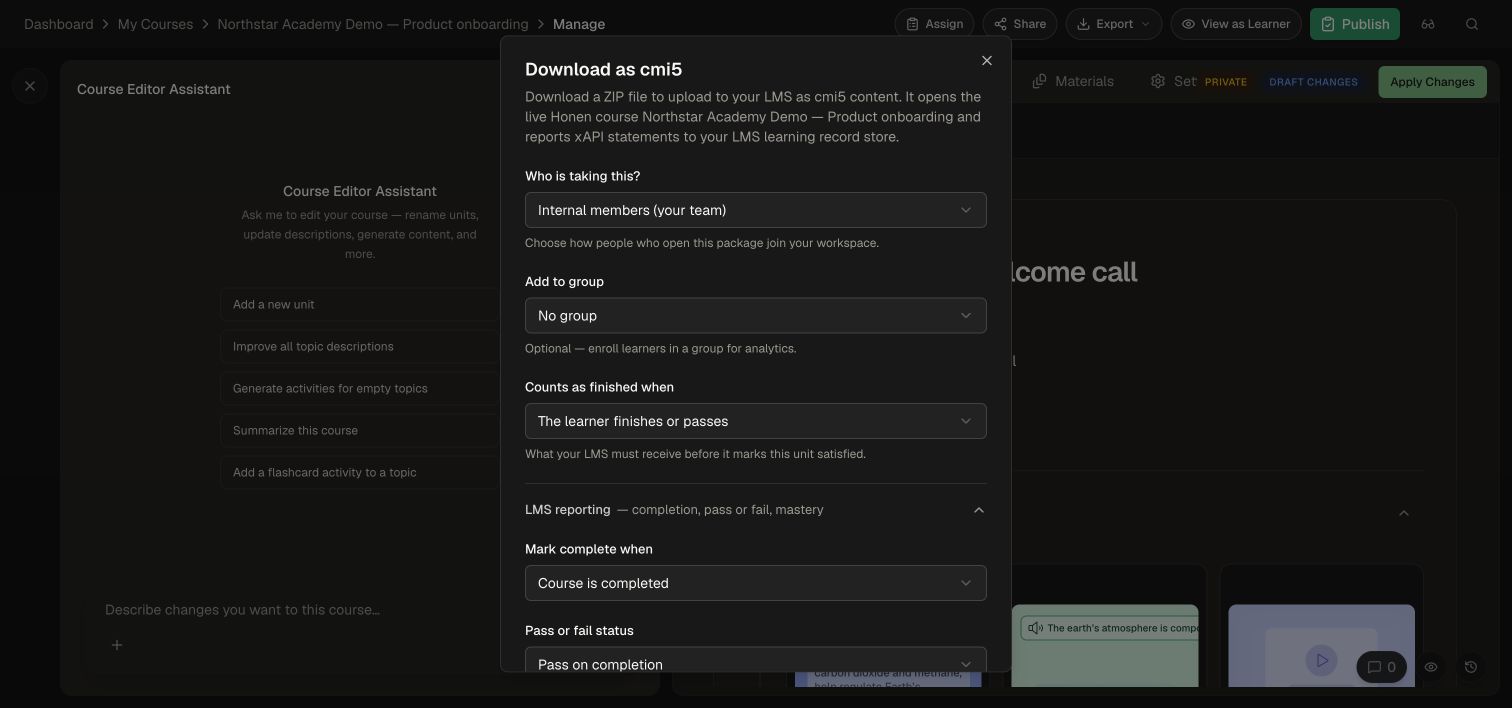
| Counts as finished when | cmi5 policy | Use it for |
|---|---|---|
| The learner finishes the course | Completed |
Completion-based training |
| The learner passes | Passed |
An outcome demonstrated through a passing result |
| The learner finishes and passes | CompletedAndPassed |
Programs requiring both completion and success |
| The learner finishes or passes | CompletedOrPassed |
Either qualifying result; the default |
| As soon as the learner opens it | NotApplicable |
Informational units with no completion or pass requirement |
3. Set completion and success reporting
- Expand LMS reporting.
- Set Mark complete when to course completion, a progress threshold, or learner launch. When choosing a threshold, enter the required percentage.
- Set Pass or fail status to Pass on completion when meeting the completion rule should count as success, or choose Don't report for completion-only reporting.
- Enter an optional Mastery score from 0 to 100 when the LMS should compare a finished attempt with that threshold. Honen reports course progress as the cmi5 score; the LMS launch can supply its own mastery threshold.
- Select Download package and save the ZIP intact.
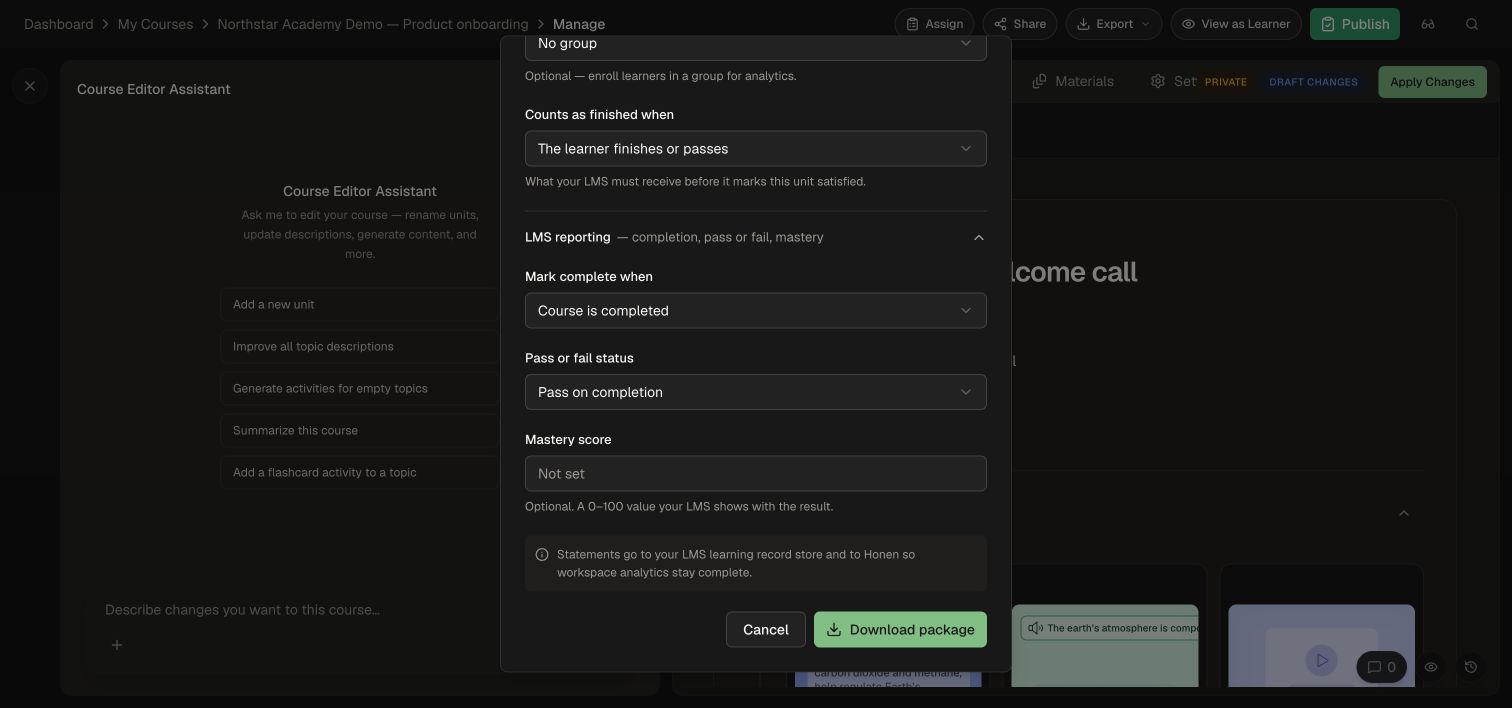
Choose reporting settings that supply the evidence required by your completion policy. For a unit that requires a pass, use Pass on completion or a mastery threshold aligned with the reported course progress. Review quiz and test performance in Honen Analytics.
4. Import and launch in your LMS
- Use your LMS's cmi5 import workflow to upload the ZIP.
- Add the imported unit to the intended course or learning program.
- Launch it as a test learner in normal learning mode.
- Confirm the learner sees the intended Honen course and joins the expected group or Site.
- Complete the work required by your policy, then exit the activity normally.
- In the LMS/LRS, confirm the learner's launch, completion or success, and session-end records. The usual sequence is
initialized→ learning →completed/passed/failed→terminated. - Relaunch to confirm the learner can continue with the expected identity and course access.
Browse and Review modes support inspection without awarding a new completion or pass. Validate your rollout using the LMS's normal learner launch mode.
Keep delivery current
Edit and publish the course in Honen to update the live content. Create a new export when you need different audience or reporting settings. Keep the activity identifier stable for an existing package so your LMS continues to associate its records with the same learning unit.
Use xAPI forwarding for a separate reporting destination, or Honen as an LRS for external clients that read or write learning records.